Your courses are found in your Dashboard which is the first page you will see after logging into your Canvas account. Your Dashboard will have your currently enrolled courses arranged in tiles with the Global Navigation bar on the left of the screen and your To-Do, Coming Up, and Recent Feedback listed on the right side of the screen. Check out the screenshot below for a visual example of this!
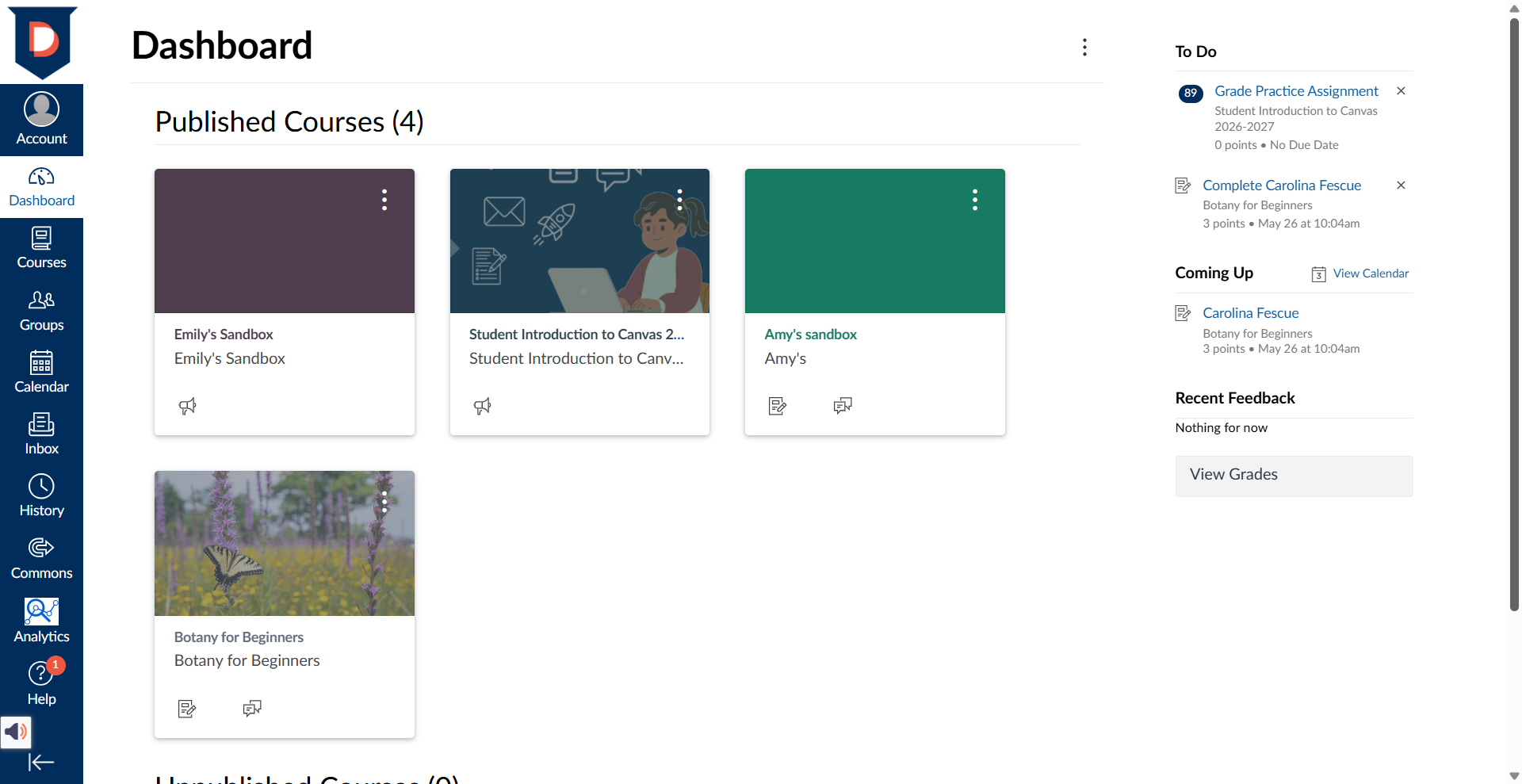
If you are having a hard time finding your course on Canvas follow these troubleshooting steps:
- Login to StormTrac to confirm you are enrolled in the course- There are multiple things you can check in StormTrac to confirm your course registration. Here are some guiding questions and things to check:
- Are you registered for the class? If the class appears on your student planning page in StormTrac, but not your course registrations, you may have missed a step during class registration. Contact your advisor.
- How is your financial aid/payment history? Check StormTrac to make sure your financial aid or personal payments have been applied to your tuition bill on time. You could have been dropped for non-payment. Depending on the circumstances/timing, you may be able to call Financial Aid or the Business office to fix the issue.
- Did you complete your Course Entry assignment by the due date? If not, you may have been dropped due to "non-attendance". This is a state rule. Most types of online courses require the submission of a Course Entry Quiz or activity in Canvas. Depending on the length of your course, this could be due just a day or two after the course start date or a more than a week into the course. Check your course schedule or email your teacher immediately if you are unsure about this due date or are struggling. If it is not completed on time, you will be dropped from the course. In an online course, the Course Entry quiz/activity submission is how your attendance is counted. Without a submission by the due date, it's like you didn't show up for your first day or week of class. Check your class registrations in StormTrac to make sure you were not dropped due to non-attendance. If you believe you were dropped by mistake, reach out to your instructor and/or advisor.
- Check your course start date - Courses become visible for you on Canvas on the first scheduled day of class. They will not appear before the start date.
- Check if you have favorited courses on your Courses page on Canvas - If you have not favorited courses in your Courses page, your Dashboard will show all currently enrolled courses. If you have favorited courses, only your favorited courses will show in your Dashboard. To change this, unfavorite all favorited courses on your Courses page.
- Reach out to your instructor - Instructors who are fixing an issue in a course may hide the course temporarily if needed. This is rare and they should send you (Davidson-Davie email) communication about this. If you have followed all the troubleshooting steps above and still do not see your course, email your instructor to let them know that you cannot see it.
Was this article helpful?
That’s Great!
Thank you for your feedback
Sorry! We couldn't be helpful
Thank you for your feedback
Feedback sent
We appreciate your effort and will try to fix the article