Columns in the gradebook are only created by adding an assignment in Canvas. If you need to create a column for an assignment that is not submitted through Canvas (like an in-class quiz or presentation, for example), you can create a No Submission or On Paper assignment.
- Open the Assignments tab located in your Course Navigation Menu
- Click on the +Assignment button.
- Enter your assignment details including a
- Name
- brief description
- points
- assignment group (if applicable), and
- grade display
- Optional: It is recommended that in your brief description that you note this is a placeholder for points to be awarded for a manually created assignment.
- Set your submission type to No submission or On Paper. This will ensure that the student does not see a Submit Assignment button when they click on this assignment.
- Save and Publish
Note: Newly created assignments will automatically appear at the end of the gradebook, before the total column.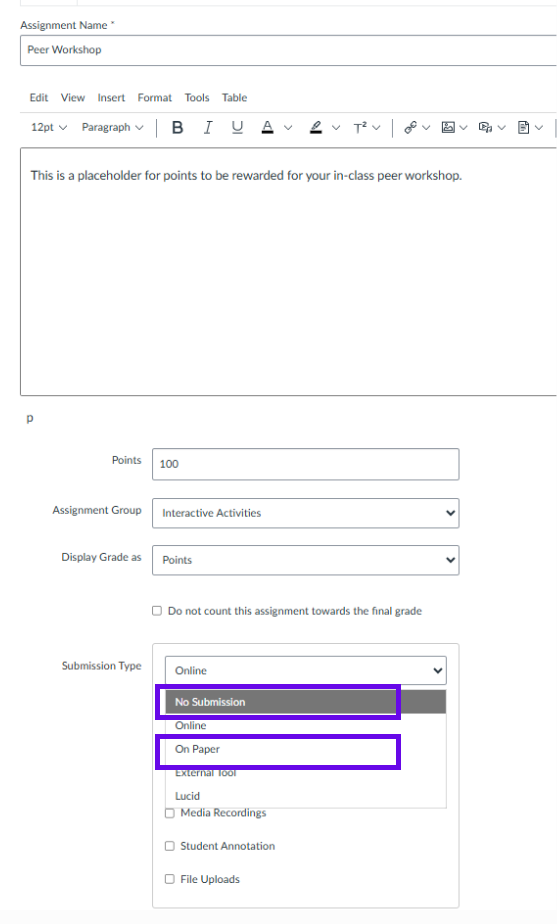
Was this article helpful?
That’s Great!
Thank you for your feedback
Sorry! We couldn't be helpful
Thank you for your feedback
Feedback sent
We appreciate your effort and will try to fix the article