There may be a few different reasons why you may need to override a student's final grade. Make sure you include comments or notes in the Canvas gradebook if you do make any manual changes to a student's final grade. This will ensure transparency and avoid complications to any future questions regarding a student's success in your course.
- In Course Navigation, click the Grades tab.
- Click the Settings icon located on the right-hand side of the gradebook
- Select the Advanced tab and check the box to “allow final grade override.”
- Apply Settings

You will now have an additional column added to the far right of the Gradebook. Enter the grade you want to override.
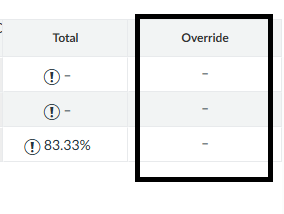
You are able to enter the new grade in the Override column. If you enter an incorrect grade, you can simply delete the grade to revert the student grade back to the original.
Was this article helpful?
That’s Great!
Thank you for your feedback
Sorry! We couldn't be helpful
Thank you for your feedback
Feedback sent
We appreciate your effort and will try to fix the article