You can view and enter grades as one of five options: points, complete/incomplete, letter grade, percentage, and GPA. Additionally, you can enter and view grades in different ways:
- Through the assignment column in the Grades tab of your Course Navigation Menu
- Through the Grade Detail Tray
- Through the SpeedGrader
You can change the view of the grades either through the settings of the original assignment, or through the gradebook.
For example, students may be able to understand a percentage better than a number of points. Quickly adjust the grade view through the gradebook.
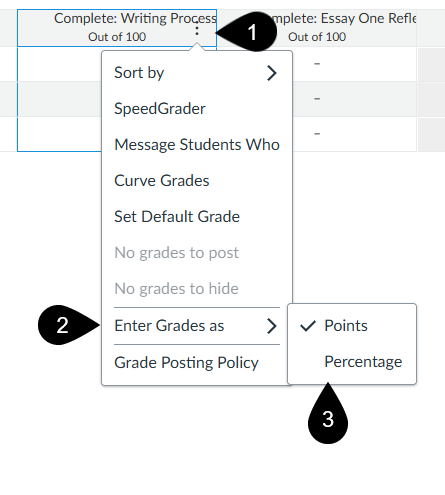
- Select the menu option next to the assignment name (marker 1)
- Hover over “Enter Grades as” (marker 2)
- Select either points or percentage (marker 3)
Was this article helpful?
That’s Great!
Thank you for your feedback
Sorry! We couldn't be helpful
Thank you for your feedback
Feedback sent
We appreciate your effort and will try to fix the article