As an institution, Davidson Davie Community College mostly uses Google apps such as Docs, Slides, Sheets, and Google Drive. However, you may need to use Microsoft apps such as Word, PowerPoint, and Excel instead in for some courses/tasks. If you need to use Microsoft, use this guide to access tools.

Accessing Microsoft 365 Online
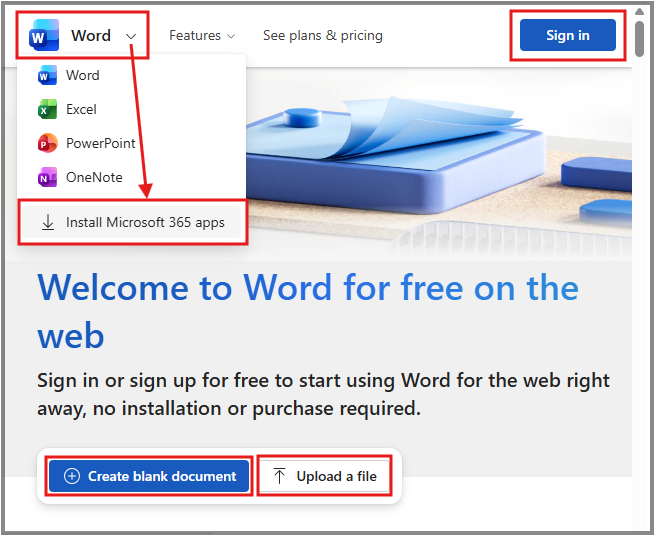
On a computer (PC or laptop), visit a Microsoft 365 tool link and click Sign In in the top right corner of your screen. Log in using your Davidson Davie Stormtrac account email address and password. For more details or help, see our Microsoft webpage.
Direct Microsoft 365 Links
- Main Portal (takes you to Microsoft Copilot)
- Word
- Excel
- PowerPoint
- OneNote
- OneDrive
Download Microsoft 365 Apps
If you need to download Microsoft 365 applications to your computer, click the logo in the top-left corner of the Word, Excel, or PowerPoint webpages. Click Install Microsoft 365 apps. See the screenshot in this guide for reference. If you are on a school-managed device and are unable to install the application yourself, request help installing Microsoft 365 by using your Davidson Davie email address to send an email to itsupport@davidsondavie.edu
Please note: If you have another version of Microsoft installed on your computer, such as Microsoft Office 2024, this is not compatible with installing Microsoft 365 apps. You cannot install both programs on your computer at the same time. These applications are very similar, but have some slight differences. Before installing something new, please confirm with your instructor whether there is a specific Microsoft version that is required to complete your course activities. This is especially important when enrolled in specific Computer Science, CIS, courses.
Was this article helpful?
That’s Great!
Thank you for your feedback
Sorry! We couldn't be helpful
Thank you for your feedback
Feedback sent
We appreciate your effort and will try to fix the article